

Overview
LGND Gradient BackScreen™ — A Brighter Backdrop for Your Aquascape
LGND Gradient BackScreen™ creates a clean blue-to-white background that complements the colours and contours of your aquarium. The smooth transition from blue at the top to white at the bottom gives the display an open, sky-inspired appearance, helping plants, fish and hardscape stand out.
Designed for the outside of the rear aquarium glass, the self-adhesive film is applied wet, so it can be slid into position before it is smoothed down and left to dry. Its light-transmitting finish allows background illumination to contribute to the final effect, while the gradient provides a decorative backdrop when used without additional lighting.
Available in eight sizes, Gradient BackScreen™ suits a range of aquarium layouts. Choose the dimensions that cover your rear glass panel and trim to fit where necessary.
Appearance varies with aquarium lighting, the colour of the wall behind the tank and any separate background illumination. The film does not produce light.
Directions
Before You Begin
You will need:
- A measuring tape
- A spray bottle and neutral washing-up liquid
- A clean, lint-free cloth
- A soft squeegee or triangle ruler
- A sharp cutter knife or scissors
- A towel to protect the aquarium stand
Install on the outside of smooth rear aquarium glass. Make sure you can comfortably reach the entire panel. For larger sheets, work with a second person.
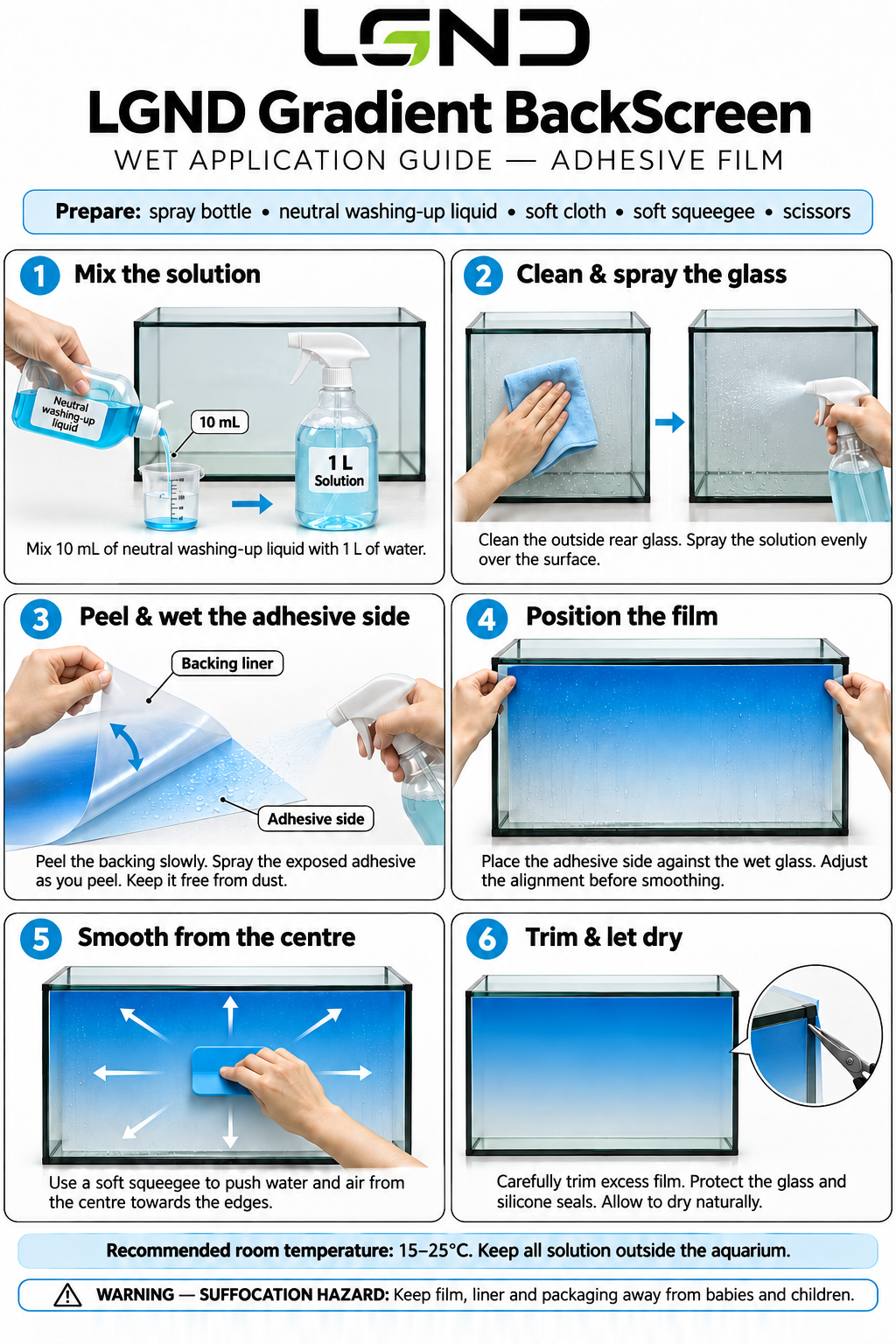
1. Mix the solution
Fill a spray bottle with approximately 1% solution of neutral washing-up liquid: 10 mL of washing-up liquid to 1 L of water.
2. Clean and spray the glass
Remove dust, fingerprints and other residue from the outside of the rear glass, then spray the solution evenly over the surface.
Protect the stand with a towel and keep the solution away from sockets, plugs and electrical equipment.
3. Peel and wet the adhesive side
Slowly peel away the backing liner while spraying the solution evenly onto the exposed adhesive side. Keep the adhesive side free from dust, dirt and fingerprints.
4. Position the film
Place the adhesive side against the wet glass, with the blue at the top and the white at the bottom. The solution allows the film to move at this stage, so adjust it until it is level and correctly aligned.
5. Smooth from the centre
Use a soft squeegee or a triangle ruler to push the solution and trapped air from the centre towards the edges. Apply light, even pressure and take care not to tear the film with the corner of the tool.
6. Trim and let dry
Once the film is firmly attached, carefully trim any excess with a sharp cutter knife, keeping the blade away from the silicone seals. Allow the film to dry naturally.
Temperature tips
- A room temperature of 15–25 °C is ideal for installation.
- Above 30 °C the solution dries quickly – increase the proportion of washing-up liquid slightly.
- In a cold room the adhesive grips less well – warm the film surface gently with a hair dryer, taking care not to overheat it.
Removal
Peel the film away slowly from a corner without sharply bending it. Once the adhesive has dried, reapplying the same sheet is not recommended.
Technical Specification
Available Sizes
Select by both width and height. Aquarium model names or nominal lengths may not match the exposed glass dimensions.
FAQ
Does the film go inside or outside the aquarium?
A: Apply it to the outside of the rear glass only. It is a decorative external background and is not intended for immersion.
Do I need glue or double-sided tape?
A: No. Gradient BackScreen™ is self-adhesive. It is applied wet using a mild solution of neutral washing-up liquid and water, and needs no additional glue or tape.
Why is a washing-up liquid solution used?
A: The solution stops the adhesive gripping straight away, so you can slide the film into the correct position. It also makes it easier to push trapped air and liquid out towards the edges before the film dries.
Why will the film not stay against the glass?
A: Check that all the solution and air has been pushed out, that the glass and adhesive side were clean, and that the edges are not resting on the frame or silicone. In a cold room, warm the film gently with a hair dryer; above 30 °C, use slightly more washing-up liquid so the solution does not dry too quickly.
How do I remove bubbles?
A: While the film is still wet, push bubbles towards the nearest edge with a soft squeegee or triangle ruler. Work from the centre outwards and do not puncture the film.
Can I cut it to fit a smaller aquarium?
A: Yes. Trim the excess carefully with a sharp cutter knife once the film is firmly attached, keeping the blade away from the silicone seals. Remember that trimming the top or bottom changes the balance of blue and white in the visible gradient.
Does it need a background light?
A: No. It can be used as a decorative background on its own. A separate background light can change its brightness and appearance, but no lighting is built into the film.
Will it hide all cables and objects behind the aquarium?
A: Not necessarily. Because the film transmits light, objects behind it may remain visible depending on their distance, colour and lighting.
Can I install it on an aquarium that is already running?
A: Yes, provided you have safe access to the entire outside rear panel. Keep all of the solution outside the aquarium, and do not move, tilt or rotate a filled aquarium to gain access.
Can the film be removed and reused?
A: It can be peeled away slowly from a corner. Once the adhesive has dried, reapplying the same sheet is not recommended, as dust and creases on the adhesive side affect the finish and adhesion.
Can't find what you're looking for? Ask us a new question. One of our technical support staff will respond.
Safety
Caution: Risk of Suffocation
- Keep the film, protective liner and packaging away from babies, children and pets. Loose plastic film can cover the nose and mouth and cause suffocation.
- This product is not a toy.
Handling Notes
- Designed for use as an external aquarium background only. Do not use for other purposes or immerse in aquarium water.
- Read all instructions carefully before installation and follow the directions provided.
- Do not move or tilt a filled aquarium during installation.
- Keep the installation solution outside the aquarium and away from electrical equipment, plugs and sockets.
- Protect furniture and aquarium stands from runoff.
- Use cutting tools carefully and keep the blade away from silicone seals.
- Avoid sharp scrapers, abrasive pads and excessive pressure.
- Use only a mild neutral washing-up liquid solution. Do not use solvents, oils or glue.
- When warming the film with a hair dryer, do not overheat it.
- Keep away from flames and hot equipment.
- Do not cover equipment ventilation openings.
- Keep cutting tools out of reach of children.